<?xml version="1.0" encoding="utf-8"?><feed xmlns="http://www.w3.org/2005/Atom" xml:lang="en-US"><generator uri="https://jekyllrb.com/" version="4.4.1">Jekyll</generator><link href="https://ulysseszh.github.io/feed/tags/tex.xml" rel="self" type="application/atom+xml" /><link href="https://ulysseszh.github.io/" rel="alternate" type="text/html" hreflang="en-US" /><updated>2026-04-30T17:49:58-07:00</updated><id>https://ulysseszh.github.io/feed/tags/tex.xml</id><title type="html"><![CDATA[Ulysses’ trip]]></title><subtitle>Here we are at the awesome (awful) blog written by UlyssesZhan!</subtitle><author><name>UlyssesZhan</name><email>ulysseszhan@gmail.com</email></author><entry><title type="html"><![CDATA[I restructured my blog]]></title><link href="https://ulysseszh.github.io/update/2023/11/06/restructure.html" rel="alternate" type="text/html" title="I restructured my blog" /><published>2023-11-06T00:06:52-08:00</published><updated>2023-11-06T00:06:52-08:00</updated><id>https://ulysseszh.github.io/update/2023/11/06/restructure</id><content type="html" xml:base="https://ulysseszh.github.io/update/2023/11/06/restructure.html"><![CDATA[<h2 data-label="0.1" id="rendering-equations-server-side">Rendering equations server-side</h2>
<p>I have been using <a href="https://mathjax.org" target="_blank" rel="external">MathJax</a> as a client-side equation renderer to render equations on my blog for a long time.</p>
<p>The main problem about the client-side rendering is that it makes people that turn off JavaScript on their browsers (e.g. for privacy reasons) unable to see the equations in my articles. Another problem is that it is annoying to wait for the browser to render all the equations, especially if the site owner could have rendered them for you.</p>
<p>I actually have had some experience in server-side equation rendering in Jekyll. In <a href="/programming/2022/11/08/math-emails.html">a past post</a>, I talked about how I used Jekyll and <a href="https://katex.org" target="_blank" rel="external">KaTeX</a> to render equations in emails server-side. For the <a href="https://sunniesnow.github.io" target="_blank" rel="external">website of Sunniesnow</a> (see <a href="/update/2023/09/08/sunniesnow.html">here</a> for a related post), I use <a href="https://github.com/linjer/jekyll-katex/" target="_blank" rel="external">jekyll-katex</a> to render the equations server-side.</p>
<p>Then, I thought, what is stopping me to render equations server-side on my blog? I then started the migration.</p>
<h3 data-label="0.1.1" id="the-painful-building">The painful building</h3>
<p>The easiest way to switch to server-side equation rendering is just to use <a href="https://github.com/kramdown/math-katex" target="_blank" rel="external">kramdown-math-katex</a>. Install the gem, add an option <code>math_engine: katex</code> into the Kramdown configurations of <code>_config.yml</code>, add the needed CSS to the theme, and… What is my computer doing? It is just stuck at building the site!</p>
<p>By adding the <code>--verbose</code> option to the <code>jekyll serve</code> command, I can see what it was doing. I can see that it is never stuck on any step, but rendering each article that has equations (especially those with a ton of ones) takes seconds. Because I have dozens of articles with equations, it takes minutes to build the site. It seems that although KaTeX has always been advertising itself as the fastest math typesetting library for the web, it is not fast enough for me to use it to render equations server-side.</p>
<p>A way to mitigate this issue is to use the <code>--incremental</code> option of <code>jekyll serve</code>. This makes the building much faster except the first time. I can also expect Jekyll to support <a href="https://github.com/jekyll/jekyll/issues/9434" target="_blank" rel="external">lazy building</a> in the future, which will entirely skip the building phase and build the files as needed on the fly.</p>
<p>I found another way to partially mitigate this issue. On my blog, I have been extensively utilizing the <code>markdownify</code> filter to render Markdown inside the templates, including the title of the posts, the excerpt of the posts, and something else. Those are rendered in multiple places, including the homepage, the archive page, the Atom feed, and the search page. Since now rendering Markdown is being very slow, I decided to cache the rendered Markdowns. A very simple strategy is as follows:</p>
<table class="rouge-table">
  <tbody>
    <tr>
      <td class="highlight language-ruby">
        <pre>
          <code>
            <span class="line line-1"><span class="k">def</span> <span class="nf">markdownify</span> <span class="n">input</span>
</span>
            <span class="line line-2">	<span class="no">UlyssesZhan</span><span class="p">.</span><span class="nf">markdown_snippet_cache</span><span class="p">[</span><span class="n">input</span><span class="p">]</span> <span class="o">||=</span> <span class="no">Filters</span><span class="p">.</span><span class="nf">instance_method</span><span class="p">(</span><span class="ss">:markdownify</span><span class="p">).</span><span class="nf">bind_call</span> <span class="nb">self</span><span class="p">,</span> <span class="n">input</span>
</span>
            <span class="line line-3"><span class="k">end</span>
</span>
          </code>
        </pre>
      </td>
    </tr>
  </tbody>
</table>
<p>Also, for most of the time I actually do not need to see the Markdown styling in the titles and excerpts, so I can also disable the <code>markdownify</code> filter depending on the site configuration, like this:</p>
<table class="rouge-table">
  <tbody>
    <tr>
      <td class="highlight language-ruby">
        <pre>
          <code>
            <span class="line line-1"><span class="k">def</span> <span class="nf">markdownify</span> <span class="n">input</span>
</span>
            <span class="line line-2">	<span class="k">return</span> <span class="n">input</span> <span class="k">if</span> <span class="vi">@context</span><span class="p">.</span><span class="nf">registers</span><span class="p">[</span><span class="ss">:site</span><span class="p">].</span><span class="nf">config</span><span class="p">[</span><span class="s1">'avoid_markdown'</span><span class="p">]</span>
</span>
            <span class="line line-3">	<span class="no">UlyssesZhan</span><span class="p">.</span><span class="nf">markdown_snippet_cache</span><span class="p">[</span><span class="n">input</span><span class="p">]</span> <span class="o">||=</span> <span class="no">Filters</span><span class="p">.</span><span class="nf">instance_method</span><span class="p">(</span><span class="ss">:markdownify</span><span class="p">).</span><span class="nf">bind_call</span> <span class="nb">self</span><span class="p">,</span> <span class="n">input</span>
</span>
            <span class="line line-4"><span class="k">end</span>
</span>
          </code>
        </pre>
      </td>
    </tr>
  </tbody>
</table>
<p>If I do not want to modify the site configuration file, I can also utilize an environment variable. I can use a <a href="https://jekyllrb.com/docs/plugins/hooks/#built-in-hook-owners-and-events" target="_blank" rel="external">after-init hook</a> to set the configuration item based on the environment variable.</p>
<p>Rendering archives has also been very slow even with this Markdown disabling trick (for some reason I do not know). I decide to use another environment variable to disable the rendering of archives. Change the line <code>gem 'jekyll-archives'</code> in Gemfile to this:</p>
<table class="rouge-table">
  <tbody>
    <tr>
      <td class="highlight language-ruby">
        <pre>
          <code>
            <span class="line line-1"><span class="n">gem</span> <span class="s1">'jekyll-archives'</span><span class="p">,</span> <span class="ss">install_if: </span><span class="o">!</span><span class="no">ENV</span><span class="p">[</span><span class="s1">'JEKYLL_NO_ARCHIVE'</span><span class="p">]</span>
</span>
          </code>
        </pre>
      </td>
    </tr>
  </tbody>
</table>
<p>By using <code>--incremental</code> and these two tricks together, I can finally build the site in seconds if I only modify one post during <code>jekyll serve</code>.</p>
<h3 data-label="0.1.2" id="cross-referencing">Cross-referencing</h3>
<p>It seems that I cannot cross-reference equations using server-side means. First, <a href="https://github.com/KaTeX/KaTeX/issues/2003" target="_blank" rel="external">KaTeX does not support cross-referencing</a>, and the current workarounds are not acceptable for my use cases.</p>
<p>I then looked at <a href="https://github.com/kramdown/math-mathjaxnode" target="_blank" rel="external">kramdown-math-mathjaxnode</a>, which uses the MathJax Node library to render equations server-side. The MathJax Node library itself does support rendering equation numbers, but kramdown-math-mathjaxnode does not support cross-referencing either. What is worse is that it has not been maintained for years, which means I probably had to rewrite the plugin myself, but I did not have spare time.</p>
<p>Even worse, Kramdown is just not suitable for implementing cross-referencing. I briefly looked at Kramdown’s source codes, and I realized that if I was about to write a math engine for Kramdown to support cross-reference, I would have to refactor Kramdown a bit. Actually, cross-referencing is quite a non-trivial feature for markup languages because of references that cannot be resolved during the first compilation. In <span class="katex"><span class="katex-mathml"><math xmlns="http://www.w3.org/1998/Math/MathML"><semantics><mrow><mtext>LaTeX</mtext></mrow><annotation encoding="application/x-tex">\LaTeX</annotation></semantics></math></span></span>, those references are resolved in the second compilation. I would need to refactor Kramdown to support a similar workflow to make it possible to implement cross-referencing.</p>
<p>Then, I looked at other Markdown engines. For Ruby, the only successful Markdown engine besides Kramdown that I know was <a href="https://github.com/vmg/redcarpet" target="_blank" rel="external">Redcarpet</a> (it used to be the default Markdown engine of Jekyll), and it was not designed with cross-referencing in mind either. Its developer even <a href="https://github.com/vmg/redcarpet/issues/313#issuecomment-35110367" target="_blank" rel="external">rejected to support math-related features</a> a long time ago.</p>
<p>This is why I looked at non-Ruby Markdown engines. The first option that I came up with and also the option that I finally chose is <a href="https://pandoc.org" target="_blank" rel="external">Pandoc</a>.</p>
<p>Pandoc is power in that its form of customization is <em>filters</em>, which transforms the whole parsed AST of the document. Because the whole AST is visible at once for a filter, it is then possible to implement cross-referencing by using a filter. Fortunately, someone has already written such a filter, and it is called <a href="https://github.com/lierdakil/pandoc-crossref" target="_blank" rel="external">pandoc-crossref</a>. What is good about this approach is that it is independent of the math engine that I use: I can use MathJax or KaTeX, client-side or server-side, and it does not matter. The only drawback about it is that it does not support cross-reference a particular line in <code>align</code> or <code>eqnarray</code> environment, which is a feature that I have used in some of my posts. I have to reword those posts to avoid using that feature.</p>
<p>Now that we have a filter, we then need a way to let Pandoc render the math expressions server-side. Fortunately (again), someone has already written a filter for this purpose, and it is called <a href="https://github.com/xu-cheng/pandoc-katex" target="_blank" rel="external">pandoc-katex</a>. Append this filter after the pandoc-crossref filter, and we are done.</p>
<p>The drawback about Pandoc is that it has no Ruby implementations, which means the only way to utilize Pandoc in Jekyll is to write a wrapper of it in Ruby and develop a Jekyll plugin for using that wrapper of Pandoc as the Markdown engine. Fortunately, someone has already done this: the wrapper is called <a href="https://github.com/xwmx/pandoc-ruby" target="_blank" rel="external">pandoc-ruby</a>, and the Jekyll plugin is called <a href="https://github.com/mfenner/jekyll-pandoc" target="_blank" rel="external">jekyll-pandoc</a>.</p>
<p>Although the math rendering problem is solved, a somewhat unrelated problem arises: Pandoc does not use <a href="https://github.com/rouge-ruby/rouge" target="_blank" rel="external">Rouge</a> to highlight code blocks, but I like Rouge. Unfortunately, no one has written a Pandoc filter to use Rouge to highlight code blocks for me; but fortunately, I can write one myself quickly because it is easy enough, especially if I utilize <a href="https://github.com/htdebeer/paru" target="_blank" rel="external">Paru</a>, which contains an API library to help me with writing Pandoc filters in Ruby.</p>
<p>Paru is actually an alternative to pandoc-ruby. Now that I also use Paru, I started to wonder if I should use pandoc-ruby at all. Considering that jekyll-pandoc has not been maintained for years, I decided to write my own Jekyll plugin to use Paru as the Markdown engine, and the simple plugin is called <a href="https://github.com/UlyssesZh/jekyll-paru" target="_blank" rel="external">jekyll-paru</a>.</p>
<h3 data-label="0.1.3" id="tedious-work-of-reformatting-the-old-posts">Tedious work of reformatting the old posts</h3>
<p>Using kramdown-math-katex is the only option that I do not need to adjust most of my posts. Another option, <a href="https://github.com/linjer/jekyll-katex/" target="_blank" rel="external">jekyll-katex</a>, is not compatible with the markup that I use to write equations. I could not either just wrap the whole <code>{{ content }}</code> inside the <code>{% katexmm %}</code> block (due to some errors that I do not know), and the error messages then were impossible to utilize to help me locate the incompatibilities.</p>
<p>For the option that I finally use, Pandoc, I also have to adjust most of my posts. The major incompatibility is that I need to change all <code>\label</code> and <code>\ref</code> to the format recognizable by pandoc-crossref. Another incompatibility is that I need to use <code>{target=_blank}</code> instead of <code>{:target="_blank"}</code> to indicate a link to be opened in a new tab (as well as other HTML attributes that I use this syntax to embed in Markdown). Also, Pandoc does not allow blank lines inside math display blocks, which I have used in some of my posts (by the way, <span class="katex"><span class="katex-mathml"><math xmlns="http://www.w3.org/1998/Math/MathML"><semantics><mrow><mtext>LaTeX</mtext></mrow><annotation encoding="application/x-tex">\LaTeX</annotation></semantics></math></span></span> does not allow those blank lines either, which is pretty annoying).</p>
<p>I then wrote a simple script that use regular expressions to help me with this refactoring task. However, because of the diversity of the syntaxes that I used, I still need to check the posts manually after I ran the script. This makes the refactoring task still very tedious.</p>
<h3 data-label="0.1.4" id="the-much-more-complicated-github-actions-workflow">The much more complicated GitHub Actions workflow</h3>
<p>Now, to build my site, the machine needs pandoc, pandoc-crossref, and pandoc-katex, none of which are Ruby Gems. I need to set up Haskell environment and Rust environment to install them. In GitHub Actions, I can use <a href="https://github.com/haskell-actions/setup" target="_blank" rel="external">haskell-actions/setup</a> to set up Haskell environment and <a href="https://github.com/baptiste0928/cargo-install" target="_blank" rel="external">cargo-install</a> to install Cargo packages.</p>
<p>I do not know how I managed to make the GitHub Actions workflow file work expectedly at one shot, but I did.</p>
<h3 data-label="0.1.5" id="table-of-contents-and-searching">Table of contents and searching</h3>
<p>I have been using <a href="https://github.com/toshimaru/jekyll-toc" target="_blank" rel="external">jekyll-toc</a> to generate the table of contents for each post. The problem with using it now is that it strips the HTML in headings and only keeps the text, so headings with math expressions will not be rendered with nice math typesetting. It was not a problem previously because the client-side math rendering script will render the math expressions in the table of contents. Now that I switched to server-side math rendering, I had to patch jekyll-toc to make it work.</p>
<p>The search functionality was implemented by myself. It is a simple client-side searching powered by <a href="https://lunrjs.com" target="_blank" rel="external">Lunr</a>. I also had to refactor the search functionality a bit to make the search results be rendered with math expressions (which were previously also handled by the client-side math rendering script).</p>
<h2 data-label="0.2" id="updating-the-theme">Updating the theme</h2>
<p>The reason that I updated the theme is actually quite dramatic. This originated from me trying to use kramdown-math-katex. To ensure that the KaTeX CSS has the correct version with the KaTeX renderer used by katex-ruby, I decided to <code>@import</code> the <a href="https://github.com/glebm/katex-ruby/blob/main/vendor/katex/sprockets/stylesheets/_katex.scss" target="_blank" rel="external">SCSS file</a> found in the repo of katex-ruby into my theme. I found that the SCSS file utilizes a function <code>asset-path</code> to load the fonts, but my CSS pre-processor does not support it, so I tried to extend my CSS pre-processor.</p>
<p>Jekyll uses <a href="https://github.com/jekyll/jekyll-sass-converter" target="_blank" rel="external">jekyll-sass-converter</a> to render CSS files, which once (v2) used <a href="https://github.com/sass/sassc-ruby" target="_blank" rel="external">sassc</a>, but now (v3) uses <a href="https://github.com/ntkme/sass-embedded-host-ruby" target="_blank" rel="external">sass-embedded</a>. The former does not support extension of custom SCSS functions, but the latter does. Therefore, I need to upgrade my jekyll-sass-converter to v3. I actually could have upgraded it earlier because I have been using Jekyll v4 for a long time, but I deliberately kept using jekyll-sass-converter v2 because <a href="https://github.com/helaili/jekyll-action" target="_blank" rel="external">jekyll-action</a>, which I used, had <a href="https://github.com/helaili/jekyll-action/issues/150" target="_blank" rel="external">an issue about using sass-embedded</a>. However, I have long ago migrated from jekyll-action to GitHub’s official <a href="https://github.com/actions/upload-pages-artifact" target="_blank" rel="external">upload-pages-artifact</a>, so I can now upgrade jekyll-sass-converter to v3.</p>
<p>Then why does this have anything to do with the theme I used (which is <a href="https://github.com/jekyll/minima" target="_blank" rel="external">Minima</a>)? After I upgraded jekyll-sass-converter to v3, I found that there are some <a href="https://github.com/jekyll/minima/issues/709" target="_blank" rel="external">deprecation warnings in the SCSS files</a> (they are actually already fixed, but I do not know why the issue is still open). This was also when I noticed that Minima has not released a new version <strong>for 4 years</strong>, and the last stable release is v2.5.1.</p>
<p>Then, how did I upgrade to Minima v3? I actually just tried to use the master branch of the Git repo of Minima, and I found that it was great.</p>
<h3 data-label="0.2.1" id="placeholder-files-for-customization">Placeholder files for customization</h3>
<p>I am glad to see Minima v3 introduced the include <code>custom-head.html</code> which allows for custom additional HTML metadata and the SCSS file <code>minima/custom-variables.scss</code> and <code>minima/custom-styles.scss</code> which allows for custom SCSS rules to override the default ones.</p>
<p>Although it took me some time to migrate my already present SCSS files and HTML metadata to the new structure, I am glad that Minima adopted this new structure that is more useful and more modern.</p>
<h3 data-label="0.2.2" id="skins">Skins</h3>
<p>Another feature that I really like about Minima v3 is the support of skins. Minima now comes with several pre-defined skins which I can choose from. The default skin called <code>classic</code> is the one that originated from Minima v2, based on which I wrote my own skin.</p>
<p>I still remember a long time ago I tried to make my site support dark theme. It was such a pain because there are so many colors hardcoded in the theme so that I have to rewrite a large part of the SCSS files provided by Minima to support dark theme. Now, Minima v3 has a pre-defined skin called <code>auto</code>, which adaptively looks the same as <code>classic</code> or <code>dark</code> based on the browser’s <code>prefers-color-scheme</code>. I can now implement my skin based on <code>auto</code> (select my skin in the site’s configuration file and <code>@import</code> the <code>auto</code> skin in my skin’s SCSS file), and the codes are now much cleaner.</p>]]></content><author><name>UlyssesZhan</name><email>ulysseszhan@gmail.com</email></author><category term="update" /><category term="jekyll" /><category term="tex" /><category term="update" /><category term="web" /><summary type="html"><![CDATA[If you have not noticed, the equations on my blog are now rendered server-side. This change makes it possible for those who turn off JavaScript on their browsers to see the equations. I also updated the theme from Minima v2 to Minima v3.]]></summary><media:thumbnail xmlns:media="http://search.yahoo.com/mrss/" url="https://ulysseszh.github.io/assets/images/covers/2023-11-06-restructure.png" /><media:content medium="image" url="https://ulysseszh.github.io/assets/images/covers/2023-11-06-restructure.png" xmlns:media="http://search.yahoo.com/mrss/" /></entry><entry><title type="html"><![CDATA[How to self-host Overleaf (ShareLaTeX)]]></title><link href="https://ulysseszh.github.io/guide/2023/09/29/self-host-overleaf.html" rel="alternate" type="text/html" title="How to self-host Overleaf (ShareLaTeX)" /><published>2023-09-29T11:11:38-07:00</published><updated>2023-09-29T11:11:38-07:00</updated><id>https://ulysseszh.github.io/guide/2023/09/29/self-host-overleaf</id><content type="html" xml:base="https://ulysseszh.github.io/guide/2023/09/29/self-host-overleaf.html"><![CDATA[<p>Install Docker and NGINX before you go. Replace every <code>overleaf.your-domain.com</code> with your own domain name.</p>
<h2 data-label="0.1" id="set-up-nginx">Set up NGINX</h2>
<table class="rouge-table">
  <tbody>
    <tr>
      <td class="highlight language-nginx">
        <pre>
          <code>
            <span class="line line-1"><span class="k">server</span> <span class="p">{</span>
</span>
            <span class="line line-2">	<span class="kn">listen</span> <span class="mi">80</span><span class="p">;</span>
</span>
            <span class="line line-3">	<span class="kn">listen</span> <span class="s">[::]:80</span><span class="p">;</span>
</span>
            <span class="line line-4">	<span class="kn">server_name</span> <span class="s">overleaf.your-domain.com</span><span class="p">;</span>
</span>
            <span class="line line-5">	<span class="kn">return</span> <span class="mi">301</span> <span class="s">https://</span><span class="nv">$host$request_uri</span><span class="p">;</span>
</span>
            <span class="line line-6"><span class="p">}</span>
</span>
            <span class="line line-7"><span class="k">server</span> <span class="p">{</span>
</span>
            <span class="line line-8">	<span class="kn">listen</span> <span class="mi">443</span> <span class="s">ssl</span><span class="p">;</span>
</span>
            <span class="line line-9">	<span class="kn">listen</span> <span class="s">[::]:443</span> <span class="s">ssl</span><span class="p">;</span>
</span>
            <span class="line line-10">	<span class="kn">server_name</span> <span class="s">overleaf.your-domain.com</span><span class="p">;</span>
</span>
            <span class="line line-11">	<span class="kn">ssl_certificate</span> <span class="n">/path/to/your/cert/fullchain.pem</span><span class="p">;</span>
</span>
            <span class="line line-12">	<span class="kn">ssl_certificate_key</span> <span class="n">/path/to/your/cert/privkey.pem</span><span class="p">;</span>
</span>
            <span class="line line-13">	<span class="kn">location</span> <span class="n">/</span> <span class="p">{</span>
</span>
            <span class="line line-14">		<span class="kn">proxy_set_header</span> <span class="s">Host</span> <span class="nv">$host</span><span class="p">;</span>
</span>
            <span class="line line-15">		<span class="kn">proxy_pass</span> <span class="s">http://localhost:8444</span><span class="p">;</span> <span class="c1"># use a port you like</span>
</span>
            <span class="line line-16">		<span class="kn">proxy_redirect</span> <span class="no">off</span><span class="p">;</span>
</span>
            <span class="line line-17">
</span>
            <span class="line line-18">		<span class="kn">proxy_http_version</span> <span class="mf">1.1</span><span class="p">;</span>
</span>
            <span class="line line-19">		<span class="kn">proxy_set_header</span> <span class="s">Upgrade</span> <span class="nv">$http_upgrade</span><span class="p">;</span>
</span>
            <span class="line line-20">		<span class="kn">proxy_set_header</span> <span class="s">Connection</span> <span class="nv">$connection_upgrade</span><span class="p">;</span>
</span>
            <span class="line line-21">		<span class="kn">proxy_set_header</span> <span class="s">X-Scheme</span> <span class="nv">$scheme</span><span class="p">;</span>
</span>
            <span class="line line-22">
</span>
            <span class="line line-23">		<span class="kn">proxy_buffering</span> <span class="no">off</span><span class="p">;</span>
</span>
            <span class="line line-24">	<span class="p">}</span>
</span>
            <span class="line line-25">	<span class="kn">location</span> <span class="p">~</span> <span class="sr">/.well-known</span> <span class="p">{</span>
</span>
            <span class="line line-26">		<span class="kn">allow</span> <span class="s">all</span><span class="p">;</span>
</span>
            <span class="line line-27">	<span class="p">}</span>
</span>
            <span class="line line-28"><span class="p">}</span>
</span>
          </code>
        </pre>
      </td>
    </tr>
  </tbody>
</table>
<h2 data-label="0.2" id="set-up-sharelatex">Set up ShareLaTeX</h2>
<p><em>Refer to</em>: <a href="https://github.com/overleaf/toolkit/blob/master/doc/quick-start-guide.md" target="_blank" rel="external">quick start guide</a>.</p>
<p>Run the following:</p>
<table class="rouge-table">
  <tbody>
    <tr>
      <td class="highlight language-shell">
        <pre>
          <code>
            <span class="line line-1"><span class="nv">OVERLEAF_HOME</span><span class="o">=</span>./overleaf <span class="c"># set to whatever you want; sudo in following if not having write access</span>
</span>
            <span class="line line-2">git clone https://github.com/overleaf/toolkit.git <span class="nv">$OVERLEAF_HOME</span>
</span>
            <span class="line line-3"><span class="nb">cd</span> <span class="nv">$OVERLEAF_HOME</span>
</span>
            <span class="line line-4">bin/init
</span>
          </code>
        </pre>
      </td>
    </tr>
  </tbody>
</table>
<p><em>Notice</em>: You may look at <code>git log -n 1 --pretty=format:"%H"</code>. Mine was <code>cc4d01bb46d4e0d7c08124372ff69a4578e7333d</code>. I can guarantee that the following steps work with this version of Overleaf toolkit, but may fail in future versions.</p>
<p>Edit <code>config/variables.env</code>, add the following:</p>
<table class="rouge-table">
  <tbody>
    <tr>
      <td class="highlight language-ini">
        <pre>
          <code>
            <span class="line line-1"><span class="c"># See https://github.com/overleaf/overleaf/issues/1044#issuecomment-1741289459</span>
</span>
            <span class="line line-2"><span class="py">PATH</span><span class="p">=</span><span class="s">/usr/local/texlive/2023/bin/x86_64-linux:/usr/local/sbin:/usr/local/bin:/usr/sbin:/usr/bin:/sbin:/bin</span>
</span>
            <span class="line line-3">
</span>
            <span class="line line-4"><span class="py">SHARELATEX_BEHIND_PROXY</span><span class="p">=</span><span class="s">true</span>
</span>
            <span class="line line-5"><span class="c"># Do NOT set SHARELATEX_SECURE_COOKIE to true, see https://github.com/overleaf/overleaf/issues/388#issuecomment-1741162658</span>
</span>
            <span class="line line-6">
</span>
            <span class="line line-7"><span class="py">SHARELATEX_SITE_URL</span><span class="p">=</span><span class="s">https://overleaf.your-domain.com</span>
</span>
            <span class="line line-8"><span class="c"># If you want, set SHARELATEX_APP_NAME, SHARELATEX_NAV_TITLE, SHARELATEX_HEADER_IMAGE_URL, SHARELATEX_ADMIN_EMAIL.</span>
</span>
            <span class="line line-9">
</span>
            <span class="line line-10"><span class="c"># Email settings, see https://github.com/overleaf/overleaf/issues/816#issuecomment-864665071</span>
</span>
            <span class="line line-11"><span class="py">SHARELATEX_EMAIL_FROM_ADDRESS</span><span class="p">=</span><span class="s">Overleaf &lt;your.email@domain.com&gt;</span>
</span>
            <span class="line line-12"><span class="c"># SHARELATEX_EMAIL_REPLY_TO does not seem to work.</span>
</span>
            <span class="line line-13"><span class="py">SHARELATEX_EMAIL_SMTP_HOST</span><span class="p">=</span><span class="s">smtp.domain.com</span>
</span>
            <span class="line line-14"><span class="py">SHARELATEX_EMAIL_SMTP_PORT</span><span class="p">=</span><span class="s">465</span>
</span>
            <span class="line line-15"><span class="py">SHARELATEX_EMAIL_SMTP_SECURE</span><span class="p">=</span><span class="s">true</span>
</span>
            <span class="line line-16"><span class="py">SHARELATEX_EMAIL_SMTP_USER</span><span class="p">=</span><span class="s">your.email@domain.com</span>
</span>
            <span class="line line-17"><span class="py">SHARELATEX_EMAIL_SMTP_PASS</span><span class="p">=</span><span class="s">yourpassword</span>
</span>
            <span class="line line-18"><span class="py">SHARELATEX_EMAIL_SMTP_TLS_REJECT_UNAUTH</span><span class="p">=</span><span class="s">false</span>
</span>
            <span class="line line-19"><span class="py">SHARELATEX_EMAIL_SMTP_IGNORE_TLS</span><span class="p">=</span><span class="s">false</span>
</span>
            <span class="line line-20">
</span>
            <span class="line line-21"><span class="c"># Uncomment this when you want to debug:</span>
</span>
            <span class="line line-22"><span class="c">#LOG_LEVEL=debug</span>
</span>
            <span class="line line-23">
</span>
            <span class="line line-24"><span class="c"># Search for process.env in github.com/overleaf/overleaf to see more options (shame for not documenting them):</span>
</span>
            <span class="line line-25"><span class="c"># https://github.com/search?q=repo%3Aoverleaf%2Foverleaf+process.env&amp;type=code</span>
</span>
          </code>
        </pre>
      </td>
    </tr>
  </tbody>
</table>
<p>Edit these entries in <code>config/overleaf.rc</code>:</p>
<table class="rouge-table">
  <tbody>
    <tr>
      <td class="highlight language-ini">
        <pre>
          <code>
            <span class="line line-1"><span class="c"># Match the port in NGINX conf</span>
</span>
            <span class="line line-2"><span class="py">SHARELATEX_PORT</span><span class="p">=</span><span class="s">8444</span>
</span>
          </code>
        </pre>
      </td>
    </tr>
  </tbody>
</table>
<p>Create a file <code>config/docker-compose.override.yml</code> and write:</p>
<table class="rouge-table">
  <tbody>
    <tr>
      <td class="highlight language-yaml">
        <pre>
          <code>
            <span class="line line-1"><span class="nn">---</span>
</span>
            <span class="line line-2"><span class="na">version</span><span class="pi">:</span> <span class="s1">'</span><span class="s">2.2'</span>
</span>
            <span class="line line-3"><span class="na">services</span><span class="pi">:</span>
</span>
            <span class="line line-4">  <span class="na">mongo</span><span class="pi">:</span>
</span>
            <span class="line line-5">    <span class="na">restart</span><span class="pi">:</span> <span class="s">unless-stopped</span>
</span>
            <span class="line line-6">    <span class="na">container_name</span><span class="pi">:</span> <span class="s">overleaf-mongo</span>
</span>
            <span class="line line-7">
</span>
            <span class="line line-8">  <span class="na">redis</span><span class="pi">:</span>
</span>
            <span class="line line-9">    <span class="na">restart</span><span class="pi">:</span> <span class="s">unless-stopped</span>
</span>
            <span class="line line-10">    <span class="na">container_name</span><span class="pi">:</span> <span class="s">overleaf-redis</span>
</span>
            <span class="line line-11">
</span>
            <span class="line line-12">  <span class="na">sharelatex</span><span class="pi">:</span>
</span>
            <span class="line line-13">    <span class="na">restart</span><span class="pi">:</span> <span class="s">unless-stopped</span>
</span>
            <span class="line line-14">    <span class="c1">#image: sharelatex/sharelatex:with-texlive-full # will be uncommented later</span>
</span>
            <span class="line line-15">    <span class="na">container_name</span><span class="pi">:</span> <span class="s">overleaf-sharelatex</span>
</span>
            <span class="line line-16">    <span class="na">stop_grace_period</span><span class="pi">:</span> <span class="s">10s</span> <span class="c1"># see https://github.com/overleaf/overleaf/issues/1156</span>
</span>
          </code>
        </pre>
      </td>
    </tr>
  </tbody>
</table>
<p>Run <code>bin/up</code>. Wait for the containers to be up. Then, go to <code>https://overleaf.your-domain.com/launchpad</code> and set up the admin account. Use <code>bin/logs</code> in another shell to check the logs if there are any issues.</p>
<h2 data-label="0.3" id="set-up-texlive">Set up TeXLive</h2>
<p><em>Refer to</em>: <a href="https://github.com/overleaf/toolkit/blob/master/doc/ce-upgrading-texlive.md" target="_blank" rel="external">upgrading TeXLive</a>.</p>
<p>While the containers are up, run <code>bin/shell</code> and run <code>tlmgr install scheme-full</code>. You need to wait for a long time. If you run into the <a href="https://github.com/overleaf/overleaf/issues/1009" target="_blank" rel="external">problem</a> of “Local TeX Live is older than remote repository,” you need to run <code>update-tlmgr-latest.sh</code> in the container (after fetching it from CTAN first).</p>
<p>After that, run <code>docker commit overleaf-sharelatex sharelatex/sharelatex:with-texlive-full</code>. Then, edit <code>config/docker-compose.override.yml</code> and uncomment the line <code>image: sharelatex/sharelatex:with-texlive-full</code>. Then, run</p>
<table class="rouge-table">
  <tbody>
    <tr>
      <td class="highlight language-shell">
        <pre>
          <code>
            <span class="line line-1">bin/stop
</span>
            <span class="line line-2">bin/docker-compose <span class="nb">rm</span> <span class="nt">-f</span> sharelatex
</span>
            <span class="line line-3">bin/up
</span>
          </code>
        </pre>
      </td>
    </tr>
  </tbody>
</table>
<p>When you upgrade later, you need to re-comment the line in <code>config/docker-compose.override.yml</code>, delete the container, and do the above steps again.</p>]]></content><author><name>UlyssesZhan</name><email>ulysseszhan@gmail.com</email></author><category term="guide" /><category term="linux" /><category term="selfhosting" /><category term="tex" /><summary type="html"><![CDATA[It has been a pain setting up Overleaf on my own server. I have finally figured it out and I am sharing my notes here.]]></summary><media:thumbnail xmlns:media="http://search.yahoo.com/mrss/" url="https://ulysseszh.github.io/assets/images/covers/2023-09-29-self-host-overleaf.png" /><media:content medium="image" url="https://ulysseszh.github.io/assets/images/covers/2023-09-29-self-host-overleaf.png" xmlns:media="http://search.yahoo.com/mrss/" /></entry><entry><title type="html"><![CDATA[Distinguishing all the letters in handwritten math/physics notes]]></title><link href="https://ulysseszh.github.io/misc/2023/02/04/handwritten-font.html" rel="alternate" type="text/html" title="Distinguishing all the letters in handwritten math/physics notes" /><published>2023-02-04T09:43:02-08:00</published><updated>2023-02-04T09:43:02-08:00</updated><id>https://ulysseszh.github.io/misc/2023/02/04/handwritten-font</id><content type="html" xml:base="https://ulysseszh.github.io/misc/2023/02/04/handwritten-font.html"><![CDATA[<p>
  <em>This article is adapted from a Chinese <a href="https://zhuanlan.zhihu.com/p/348630262" target="_blank" rel="external">article</a> on my Zhihu account. The original article was posted at 2021-02-02 00:41 +0800. There are some minor modifications to the original article as well as some added contents.</em>
</p>
<hr/>
<p>Personally, I have the demand of handwriting math/physics notes, but an annoying fact about this is that I usually cannot distinguish every letter that may be possibly used well enough.</p>
<p>In this article, I will try to settle this problem.</p>
<p>
  <strong>This article does not involve calligraphy, and I myself have not learnt calligraphy specially ever.</strong>
</p>
<p>This article is written also for giving some warn and advice to those who <strong>read letters arbitrarily without actually recognizing them and thus even mislead others (unintentionally)</strong>.</p>
<h2 data-label="0.1" id="list-of-different-styles">List of different styles</h2>
<p>Here is a full list of different styles <strong>except for their bold counterparts</strong>:</p>
<table>
<thead>
<tr>
<th>Style name</th>
<th><span class="katex"><span class="katex-mathml"><math xmlns="http://www.w3.org/1998/Math/MathML"><semantics><mrow><mtext>LaTeX</mtext></mrow><annotation encoding="application/x-tex">\LaTeX</annotation></semantics></math></span></span> command</th>
<th>Example</th>
</tr>
</thead>
<tbody>
<tr>
<td>Roman</td>
<td><code>\mathrm</code></td>
<td><span class="katex"><span class="katex-mathml"><math xmlns="http://www.w3.org/1998/Math/MathML"><semantics><mrow><mi mathvariant="normal">A</mi><mi mathvariant="normal">B</mi><mi mathvariant="normal">C</mi></mrow><annotation encoding="application/x-tex">\mathrm{ABC}</annotation></semantics></math></span></span></td>
</tr>
<tr>
<td>Italic</td>
<td><code>\mathit</code></td>
<td><span class="katex"><span class="katex-mathml"><math xmlns="http://www.w3.org/1998/Math/MathML"><semantics><mrow><mi>A</mi><mi>B</mi><mi>C</mi></mrow><annotation encoding="application/x-tex">\mathit{ABC}</annotation></semantics></math></span></span></td>
</tr>
<tr>
<td>Blackboard</td>
<td><code>\mathbb</code></td>
<td><span class="katex"><span class="katex-mathml"><math xmlns="http://www.w3.org/1998/Math/MathML"><semantics><mrow><mi mathvariant="double-struck">A</mi><mi mathvariant="double-struck">B</mi><mi mathvariant="double-struck">C</mi></mrow><annotation encoding="application/x-tex">\mathbb{ABC}</annotation></semantics></math></span></span></td>
</tr>
<tr>
<td>Calligraphic</td>
<td><code>\mathcal</code></td>
<td><span class="katex"><span class="katex-mathml"><math xmlns="http://www.w3.org/1998/Math/MathML"><semantics><mrow><mi mathvariant="script">A</mi><mi mathvariant="script">B</mi><mi mathvariant="script">C</mi></mrow><annotation encoding="application/x-tex">\mathcal{ABC}</annotation></semantics></math></span></span></td>
</tr>
<tr>
<td>Script</td>
<td><code>\mathscr</code></td>
<td><span class="katex"><span class="katex-mathml"><math xmlns="http://www.w3.org/1998/Math/MathML"><semantics><mrow><mi mathvariant="script">A</mi><mi mathvariant="script">B</mi><mi mathvariant="script">C</mi></mrow><annotation encoding="application/x-tex">\mathscr{ABC}</annotation></semantics></math></span></span></td>
</tr>
<tr>
<td>Fraktur</td>
<td><code>\mathfrak</code></td>
<td><span class="katex"><span class="katex-mathml"><math xmlns="http://www.w3.org/1998/Math/MathML"><semantics><mrow><mi mathvariant="fraktur">A</mi><mi mathvariant="fraktur">B</mi><mi mathvariant="fraktur">C</mi></mrow><annotation encoding="application/x-tex">\mathfrak{ABC}</annotation></semantics></math></span></span></td>
</tr>
<tr>
<td>Sans-serif</td>
<td><code>\mathsf</code></td>
<td><span class="katex"><span class="katex-mathml"><math xmlns="http://www.w3.org/1998/Math/MathML"><semantics><mrow><mi mathvariant="sans-serif">A</mi><mi mathvariant="sans-serif">B</mi><mi mathvariant="sans-serif">C</mi></mrow><annotation encoding="application/x-tex">\mathsf{ABC}</annotation></semantics></math></span></span></td>
</tr>
<tr>
<td>Typewriter</td>
<td><code>\mathtt</code></td>
<td><span class="katex"><span class="katex-mathml"><math xmlns="http://www.w3.org/1998/Math/MathML"><semantics><mrow><mi mathvariant="monospace">A</mi><mi mathvariant="monospace">B</mi><mi mathvariant="monospace">C</mi></mrow><annotation encoding="application/x-tex">\mathtt{ABC}</annotation></semantics></math></span></span></td>
</tr>
</tbody>
</table>
<p>We are <strong>not</strong> going to distinguish all the letters and all the styles.</p>
<h2 data-label="0.2" id="some-principles">Some principles</h2>
<p>I will try to find a handwriting style that satisfies the following conditions (in descending order of importance):</p>
<ol type="1">
<li>I am able to write them fast and simply.</li>
<li>I am able to recognize each character at a glance.</li>
<li>The style is consistent for all letters.</li>
<li>The shape is similar to the default mathematical font of <span class="katex"><span class="katex-mathml"><math xmlns="http://www.w3.org/1998/Math/MathML"><semantics><mrow><mtext>LaTeX</mtext></mrow><annotation encoding="application/x-tex">\LaTeX</annotation></semantics></math></span></span> (Computer Modern).</li>
<li>If the last condition cannot be satisfied, the shape is similar to some style that ever existed.</li>
</ol>
<p class="no-indent">
The reason for the 2nd principle to be lower than the 1st is that the efficiency of taking notes should not be too low and that one may distinguish letters and styles by the context.
</p>
<p>If a style fails to satisfy the 5th or the 4th principle (i.e. this style is invented by me), I will add an exclamation mark (<strong>!</strong>) to inform you of this.</p>
<p>The following lists all the letters and the styles that I want to distinguish:</p>
<ul>
<li>Digits: <em>0</em>, <em>1</em>, <em>2</em>, <em>3</em>, <em>4</em>, <em>5</em>, <em>6</em>, <em>7</em>, <em>8</em>, <em>9</em> (they are not letters, but they deserve distinguishing).</li>
<li>Roman style of uppercase English letters: <em>A</em>, <em>B</em>, <em>C</em>, <em>D</em>, <em>E</em>, <em>F</em>, <em>G</em>, <em>H</em>, <em>I</em>, <em>J</em>, <em>K</em>, <em>L</em>, <em>M</em>, <em>N</em>, <em>O</em>, <em>P</em>, <em>Q</em>, <em>R</em>, <em>S</em>, <em>T</em>, <em>U</em>, <em>V</em>, <em>W</em>, <em>X</em>, <em>Y</em>, <em>Z</em>.</li>
<li>Italic style of uppercase English letters: <em>A</em>, <em>B</em>, <em>C</em>, <em>D</em>, <em>E</em>, <em>F</em>, <em>G</em>, <em>H</em>, <em>I</em>, <em>J</em>, <em>K</em>, <em>L</em>, <em>M</em>, <em>N</em>, <em>P</em>, <em>Q</em>, <em>R</em>, <em>S</em>, <em>T</em>, <em>U</em>, <em>V</em>, <em>W</em>, <em>X</em>, <em>Y</em>, <em>Z</em> (not including <em>O</em>).</li>
<li>Roman style of lowercase English letters: <em>a</em>, <em>b</em>, <em>c</em>, <em>d</em>, <em>e</em>, <em>f</em>, <em>g</em>, <em>h</em>, <em>i</em>, <em>j</em>, <em>k</em>, <em>l</em>, <em>m</em>, <em>n</em>, <em>o</em>, <em>p</em>, <em>q</em>, <em>r</em>, <em>s</em>, <em>t</em>, <em>u</em>, <em>v</em>, <em>w</em>, <em>x</em>, <em>y</em>, <em>z</em>.</li>
<li>Italic style of lowercase English letters: <em>a</em>, <em>b</em>, <em>c</em>, <em>d</em>, <em>e</em>, <em>f</em>, <em>g</em>, <em>h</em>, <em>i</em>, <em>j</em>, <em>k</em>, <em>l</em>, <em>m</em>, <em>n</em>, <em>p</em>, <em>q</em>, <em>r</em>, <em>s</em>, <em>t</em>, <em>u</em>, <em>v</em>, <em>w</em>, <em>x</em>, <em>y</em>, <em>z</em> (not including <em>o</em>).</li>
<li>Roman style of uppercase Greek letters: <em>Gamma</em>, <em>Delta</em>, <em>Theta</em>, <em>Lambda</em>, <em>Xi</em>, <em>Pi</em>, <em>Sigma</em>, <em>Upsilon</em>, <em>Phi</em>, <em>Psi</em>, <em>Omega</em> (not including any letters that cannot be distinguished from english uppercase letters).</li>
<li>Italic style of lowercase Greek letters: <em>alpha</em>, <em>beta</em>, <em>gamma</em>, <em>delta</em>, <em>epsilon</em>, <em>zeta</em>, <em>eta</em>, <em>theta</em>, <em>iota</em>, <em>kappa</em>, <em>lambda</em>, <em>mu</em>, <em>nu</em>, <em>xi</em>, <em>pi</em>, <em>rho</em>, <em>sigma</em>, <em>tau</em>, <em>upsilon</em>, <em>phi</em>, <em>chi</em>, <em>psi</em>, <em>omega</em> (not including <em>omicron</em>).</li>
<li>Blackboard bold style of uppercase English letters: <em>A</em>, <em>B</em>, <em>C</em>, <em>D</em>, <em>E</em>, <em>F</em>, <em>G</em>, <em>H</em>, <em>I</em>, <em>J</em>, <em>K</em>, <em>L</em>, <em>M</em>, <em>N</em>, <em>O</em>, <em>P</em>, <em>Q</em>, <em>R</em>, <em>S</em>, <em>T</em>, <em>U</em>, <em>V</em>, <em>W</em>, <em>X</em>, <em>Y</em>, <em>Z</em>.</li>
<li>Calligraphic style of uppercase English letters: <em>A</em>, <em>B</em>, <em>C</em>, <em>D</em>, <em>E</em>, <em>F</em>, <em>G</em>, <em>H</em>, <em>I</em>, <em>J</em>, <em>K</em>, <em>L</em>, <em>M</em>, <em>N</em>, <em>O</em>, <em>P</em>, <em>Q</em>, <em>R</em>, <em>S</em>, <em>T</em>, <em>U</em>, <em>V</em>, <em>W</em>, <em>X</em>, <em>Y</em>, <em>Z</em>.</li>
<li>Script style of uppercase English letters: <em>A</em>, <em>B</em>, <em>C</em>, <em>D</em>, <em>E</em>, <em>F</em>, <em>G</em>, <em>H</em>, <em>I</em>, <em>J</em>, <em>K</em>, <em>L</em>, <em>M</em>, <em>N</em>, <em>O</em>, <em>P</em>, <em>Q</em>, <em>R</em>, <em>S</em>, <em>T</em>, <em>U</em>, <em>V</em>, <em>W</em>, <em>X</em>, <em>Y</em>, <em>Z</em>.</li>
<li>Fraktur style of uppercase English letters: <em>A</em>, <em>B</em>, <em>C</em>, <em>D</em>, <em>E</em>, <em>F</em>, <em>G</em>, <em>H</em>, <em>I</em>, <em>J</em>, <em>K</em>, <em>L</em>, <em>M</em>, <em>N</em>, <em>O</em>, <em>P</em>, <em>Q</em>, <em>R</em>, <em>S</em>, <em>T</em>, <em>U</em>, <em>V</em>, <em>W</em>, <em>X</em>, <em>Y</em>, <em>Z</em>.</li>
<li>Fraktur style of lowercase English letters: <em>a</em>, <em>b</em>, <em>c</em>, <em>d</em>, <em>e</em>, <em>f</em>, <em>g</em>, <em>h</em>, <em>i</em>, <em>j</em>, <em>k</em>, <em>l</em>, <em>m</em>, <em>n</em>, <em>o</em>, <em>p</em>, <em>q</em>, <em>r</em>, <em>s</em>, <em>t</em>, <em>u</em>, <em>v</em>, <em>w</em>, <em>x</em>, <em>y</em>, <em>z</em>.</li>
</ul>
<p class="no-indent">
In terms of linguistic terminology, each entry in the above list is a grapheme in my handwritten notes. However, in extreme cases, even if I have actively avoided, it is still possible that two graphemes are indistinguishable. Then, I will design allographs for those graphemes to provide extra distinguishability in extreme cases.
</p>
<p>Here are some of the general rules that I set up:</p>
<ul>
<li>We do not write any serif unless it is a must for distinguishing letters. (This is also why I did not plan to distinguish sans-serif styles.)</li>
<li>The roman style of all english letters does not have tails (either ornamental or used for ligatures in connected writing).</li>
<li>For both roman and italic styles, all uppercase letters (both English and Greek) have the same position of bottom and top.</li>
</ul>
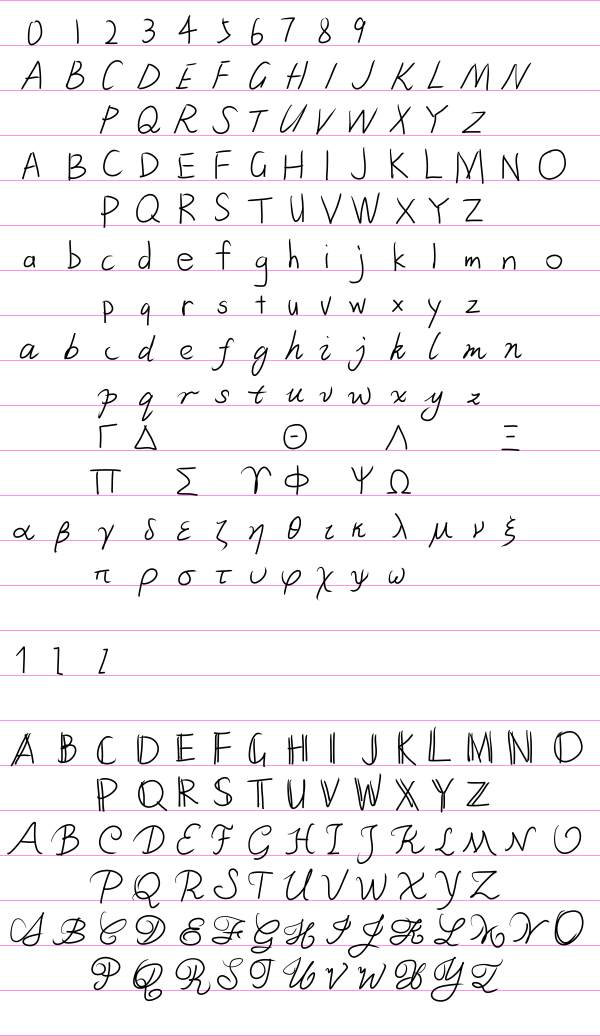
<p>For other details, look at this image:</p>
<figure>
<img src="/assets/images/figures/2023-02-04-handwritten-font/letters.svg" class="dark-adaptive" alt="Handwritten letters"/>

</figure>
<h2 data-label="0.3" id="roman-and-italic">Roman and italic</h2>
<h3 data-label="0.3.1" id="a-a-alpha"><em>A</em>, <em>a</em>, <em>alpha</em></h3>
<p>In italic style, the slanted line in the right side of <em>A</em> is nearly vertical. Actually, in the italic style of uppercase letters, almost all top-left-to-bottom-right slanted lines are nearly vertical.</p>
<p>To write conveniently, use the single-story glyph of <em>a</em> even for its roman style.</p>
<p>The difference of the glyph of <em>alpha</em> and that of <em>a</em> should be noticeable.</p>
<h3 data-label="0.3.2" id="c-c-sigma"><em>C</em>, <em>c</em>, <em>sigma</em></h3>
<p><em>C</em> and <em>c</em> are tricky because it is very hard to distinguish roman and italic styles for them, but we have to because they are very commonly used. We need to be careful when writing and recognizing them.</p>
<p>Roman style of <em>C</em> is largely vertically symmetrical, while the italic style of <em>C</em> is not. In the italic style of <em>C</em>, the top endpoint of the stroke is to the right of the bottom endpoint, and the left-most position on the stroke is below the center instead of being at the same level as the center.</p>
<p>The opening direction of the roman style of <em>c</em> is to the right, while that of the italic style is to the top-right.</p>
<p>(I once tried using ornamental tails to distinguish the italic style of <em>c</em> from the roman style, but it would make them look strange and may possibly confuse with other letters.)</p>
<p>At first, I did not want to distinguish the roman and italic styles of <em>c</em>, but I found that it is useful to distinguish them. For example, some times we use <span class="katex"><span class="katex-mathml"><math xmlns="http://www.w3.org/1998/Math/MathML"><semantics><mrow><mi>a</mi><mo separator="true">,</mo><mi>b</mi><mo separator="true">,</mo><mi>c</mi></mrow><annotation encoding="application/x-tex">a,b,c</annotation></semantics></math></span></span> for indices, so the italic style of <em>c</em> may be used as an index; meanwhile, we may use roman style of <em>c</em> to represent “center” so that we can express the position of the center as <span class="katex"><span class="katex-mathml"><math xmlns="http://www.w3.org/1998/Math/MathML"><semantics><mrow><msub><mi mathvariant="bold">r</mi><mi mathvariant="normal">c</mi></msub></mrow><annotation encoding="application/x-tex">\mathbf r_\mathrm c</annotation></semantics></math></span></span>. In both cases, the letter <em>c</em> appears in the position of a subscript, but they need to be distinguished from each other.</p>
<p>I want to talk about <em>sigma</em> here because in Greek, its final form <span class="katex"><span class="katex-mathml"><math xmlns="http://www.w3.org/1998/Math/MathML"><semantics><mrow><mi>ς</mi></mrow><annotation encoding="application/x-tex">\varsigma</annotation></semantics></math></span></span> looks very similar to <em>c</em>. Just do not use that glyph for <em>sigma</em>.</p>
<h3 data-label="0.3.3" id="e">
  <em>e</em>
</h3>
<p>It is important to distinguish the roman and italic styles of <em>e</em> because we may use <span class="katex"><span class="katex-mathml"><math xmlns="http://www.w3.org/1998/Math/MathML"><semantics><mrow><mi mathvariant="normal">e</mi></mrow><annotation encoding="application/x-tex">\mathrm e</annotation></semantics></math></span></span> for the base of natural logarithm and use <span class="katex"><span class="katex-mathml"><math xmlns="http://www.w3.org/1998/Math/MathML"><semantics><mrow><mi>e</mi></mrow><annotation encoding="application/x-tex">e</annotation></semantics></math></span></span> for the electric charge of a proton.</p>
<p>At the turning point of the stroke at the center-right of the glyph, the roman style of <em>e</em> is sharp while the italic style is round. This detail is enough to distinguish them.</p>
<h3 data-label="0.3.4" id="f">
  <em>f</em>
</h3>
<p>The roman style of <em>f</em> is not a descender while the italic style is a descender. Also, the italic style of <em>f</em> has a left-tail in the bottom.</p>
<h3 data-label="0.3.5" id="g">
  <em>g</em>
</h3>
<p>To make writing convenient, the roman style of <em>g</em> uses the single-story glyph. It would make it hard to distinguish it from the italic style, but we may write descender of the italic style of <em>g</em> in a exaggerated way to distinguish them.</p>
<h3 data-label="0.3.6" id="i-l"><em>1</em>, <em>I</em>, <em>l</em></h3>
<p>Here we are at the only extreme case where multiple graphemes share the same glyph: <em>1</em>, roman style of <em>I</em>, and roman style of <em>l</em>. They are all simply a vertical line.</p>
<p>Normally we should be able to distinguish them by their context, but in some cases we need to distinguish them clearly. We may add some small turnings at the top and bottom of <em>I</em> to distinguish it from <em>l</em>. It is like we are trying to write the serifs of <em>I</em> but we write so fast that they are connected and look like small turnings.</p>
<p>A small sharpe turning may be added at the top of <em>1</em> to distinguish it from <em>l</em>.</p>
<h3 data-label="0.3.7" id="i-iota"><em>i</em>, <em>iota</em></h3>
<p>The italic style of <em>i</em> has two tails (one left-tail in the middle and one right-tail in the bottom). It looks exactly the same as <em>iota</em> except for the dot at the top.</p>
<h3 data-label="0.3.8" id="k-k-kappa"><em>K</em>, <em>k</em>, <em>kappa</em></h3>
<p>In both the roman and italic styles of <em>K</em>, the endpoint of the stroke branch of <em>K</em> at the top-right is approximately at the same level as the top endpoint of the vertical line at the left.</p>
<p>The slantation of the left vertical line should be enough to distinguish the italic style of <em>K</em> from the roman style, but we may also add a small tail at the bottom-right to distinguish them further. Do not worry about confusing with <em>kappa</em> because we have other ways to distinguish it.</p>
<p>In the italic style of <em>k</em>, the top-right stroke branch is written as a closed circle. This makes it easier to distinguish from <em>K</em> and <em>kappa</em>.</p>
<p><em>kappa</em> is shorter than <em>K</em> and <em>k</em>. The bottom-right stroke branch is written in shape of an inclined mirrored S-curve to distinguish from <em>K</em> and <em>k</em>. The endpoint of the stroke branch of <em>kappa</em> at the top-right is approximately at the same level as the top endpoint of the vertical line at the left.</p>
<h3 data-label="0.3.9" id="m-mu"><em>M</em>, <em>mu</em></h3>
<p>In the italic style of <em>M</em>, the bottom is wider than the top, while in the roman style, the top is as wide as the bottom. Write <em>M</em> in four strokes to distinguish it from <em>mu</em>.</p>
<p>As for <em>mu</em>, note that the bottom-left corner is a descender, while other parts are not.</p>
<h3 data-label="0.3.10" id="o-o"><em>0</em>, <em>O</em>, <em>o</em></h3>
<p>These are the most cursed characters, even more than <em>1</em>, <em>I</em>, and <em>l</em>. They are so cursed that I refuse to distinguish the roman style of <em>O</em> and <em>o</em> from the italic style, and I would refuse to use the italic style of <em>O</em> and <em>o</em> in my hand written notes.</p>
<p>The digit <em>0</em> is narrower than <em>O</em> and <em>o</em>.</p>
<p>Just avoid using <em>omicron</em> because it is indistinguishable from <em>o</em>.</p>
<h3 data-label="0.3.11" id="p-rho"><em>p</em>, <em>rho</em></h3>
<p>Write the italic style of <em>p</em> in two strokes, and it has two left-tails, one at the top-left and one at the bottom-left.</p>
<p>Write <em>rho</em> in one stroke. Starting the stroke from below the baseline (at the bottom of the descender) is recommended.</p>
<h3 data-label="0.3.12" id="q-q"><em>Q</em>, <em>q</em></h3>
<p>In the italic style of <em>Q</em>, the last stroke looks like a tilde. It is straight for the roman style.</p>
<p>The italic style of <em>q</em> has a sharp right-tail in the bottom.</p>
<h3 data-label="0.3.13" id="r-u-v-gamma-nu-upsilon-upsilon"><em>r</em>, <em>u</em>, <em>v</em>, <em>gamma</em>, <em>nu</em>, <em>Upsilon</em>, <em>upsilon</em></h3>
<p>OK, this is important.</p>
<blockquote>
Every physicist must have met at least one person who mistakenly recognized <em>nu</em> as <em>v</em>.
</blockquote>
<p>The roman style of <em>r</em> does not have tails (the arc at the top-right does not count as a tail). The italic style of <em>r</em> has a left-tail at the top-left and a right-tail at the top-right. The downward part and the upward part of the stroke overlap at the bottom to distinguish it from <em>v</em>.</p>
<p>The italic style of <em>u</em> has a left-tail at the top-left and a right-tail at the bottom-right. The tail at bottom-right distinguishes it from <em>v</em>.</p>
<p>The italic style of <em>v</em> has a left-tail at the top-left and a left-tail at the top-right. The tail at top-right is ommitable because it is not very noticeable. The bottom of both the roman style and italic style of <em>v</em> is a sharp turning.</p>
<p>The top-left of <em>gamma</em> is curvy while the top-right is straight. The letter is also a descender, so make its bottom lower than the baseline.</p>
<p>The left of <em>nu</em> is a vertical line. The right of <em>nu</em> is like a broken line (<strong>!</strong>). The left and right parts are tangent to each other at the bottom but separates quickly (<strong>!</strong>).</p>
<p>Both the top-left and top-right of <em>Upsilon</em> are curvy. It is thus different from <em>r</em> or <em>gamma</em>.</p>
<p>The letter <em>upsilon</em> is not commonly used. If it is used, its bottom is round instead of being sharp, to distinguish it from the italic style of <em>v</em>.</p>
<h3 data-label="0.3.14" id="s-s"><em>S</em>, <em>s</em></h3>
<p>They are cursed, but not as cursed as <em>O</em> and <em>o</em>.</p>
<p>In the italic style of <em>S</em> and <em>s</em>, the bottom-left is to the left of the top-left. In the roman style, the bottom-left and the top-left are aligned instead.</p>
<h3 data-label="0.3.15" id="t-tau"><em>t</em>, <em>tau</em></h3>
<p>The roman style of <em>t</em> is a straight cross (no curvy strokes) to distinguish it from the italic style.</p>
<p>The horizontal stroke of multiple <em>f</em>’s and <em>t</em>’s may be connected (ligature). Note that they may only be connected if they are intended to form a word. If they are written together just for mathematical multiplication, there should not be a ligature.</p>
<p>The bottom of <em>tau</em> may be either turing to the right or stopping just straightly. I prefer it turning to the right.</p>
<h3 data-label="0.3.16" id="u">
  <em>U</em>
</h3>
<p>To distinguish from cup (the symbol for set union), add a vertical line at the right of the glyph (for both the roman and italic styles), but the italic style of it does not have a tail.</p>
<h3 data-label="0.3.17" id="w-w-omega"><em>W</em>, <em>w</em>, <em>omega</em></h3>
<p>Just like how many people mistakenly recognize <em>nu</em> as <em>v</em>, many people also mistakenly recognize <em>omega</em> as <em>w</em>.</p>
<p>The top-left and top-right of <em>w</em> are the same as those of <em>v</em> for both roman and italic styles.</p>
<p>The letter <em>W</em> is not the same as a upside-down <em>M</em>. For both roman and italic styles, the top of <em>W</em> is wider than the bottom.</p>
<p>There is a right-tail at the top-left of <em>omega</em>. The bottom of <em>omega</em> is round instead of being sharp.</p>
<h3 data-label="0.3.18" id="x-x-chi"><em>X</em>, <em>x</em>, <em>chi</em></h3>
<p>There are not as many people who mistakenly recognize <em>chi</em> as <em>x</em> as there are for <em>nu</em> and <em>omega</em>, but there are still many.</p>
<p>It is a little hard to distinguish the roman and italic styles of <em>X</em>. First, the top-right-to-bottom-left stroke of <em>X</em> is longer in the italic style to embody the feel of slantation. Also, in the italic style, the top-left of <em>X</em> is to the left of the bottom-left. These should be enough to distinguish it from the roman style. Note that the italic style of <em>X</em> is a little different from the italic styles of other letters in that the top-left-to-bottom-right stroke is not nearly vertical (because otherwise it would look strange).</p>
<p>The italic style of <em>x</em> has a left-tail at the top-left and a right-tail at the bottom-right. The bottom-left and the top-right do not have tails (for convenience). Write <em>x</em> as a cross instead of two C-curves tangent to each other (I know some people write it like that).</p>
<p>The top-left of <em>chi</em> has a left-tail, and the bottom-right has a right-tail. The bottom-left of <em>chi</em> has a right-tail (<strong>!</strong>), which is the main feature to distinguish it from <em>x</em>. Also, note that <em>chi</em> is a descender, and the intersection of the two strokes is at the baseline.</p>
<h3 data-label="0.3.19" id="y-y"><em>Y</em>, <em>y</em></h3>
<p>Write <em>Y</em> in three strokes.</p>
<p>Write the roman style of <em>y</em> in two strokes, both of which are straight. The italic style of <em>y</em> is the the same as the italic style of <em>u</em> but the tail at the bottom-right is changed into a descender like that of <em>g</em>.</p>
<h3 data-label="0.3.20" id="z-z"><em>2</em>, <em>Z</em>, <em>z</em></h3>
<p>Some people add a short stroke in the middle of <em>z</em> (I used to do that) or add a descender at the bottom like that of <em>g</em> to distinguish it from <em>2</em>. I use neither of them because the sharp turning corner at the top-right of <em>z</em> is enough to distinguish it from <em>2</em>.</p>
<p>The top and bottom of <em>Z</em> are aligned in the roman style, but the top is a little bit offset to the left of the bottom in the italic style.</p>
<p>The bottom of the italic style of <em>z</em> is written like a tilde.</p>
<h3 data-label="0.3.21" id="epsilon">
  <em>epsilon</em>
</h3>
<p>In Greek, there are two glyphs for <em>epsilon</em>, one of which is called the lunate epsilon or the uncial epsilon <span class="katex"><span class="katex-mathml"><math xmlns="http://www.w3.org/1998/Math/MathML"><semantics><mrow><mi>ϵ</mi></mrow><annotation encoding="application/x-tex">\epsilon</annotation></semantics></math></span></span>, and the other <span class="katex"><span class="katex-mathml"><math xmlns="http://www.w3.org/1998/Math/MathML"><semantics><mrow><mi>ε</mi></mrow><annotation encoding="application/x-tex">\varepsilon</annotation></semantics></math></span></span> does not have a name but I like to call it varepsilon (because the command for the glyph in <span class="katex"><span class="katex-mathml"><math xmlns="http://www.w3.org/1998/Math/MathML"><semantics><mrow><mtext>LaTeX</mtext></mrow><annotation encoding="application/x-tex">\LaTeX</annotation></semantics></math></span></span> is <code>\varepsilon</code>).</p>
<p>Use varepsilon. Never use the lunate epsilon because it confuses with the set membership symbol.</p>
<h3 data-label="0.3.22" id="theta-theta"><em>Theta</em>, <em>theta</em></h3>
<p>Write <em>Theta</em> as wide as <em>O</em>, and do not make the stroke in the middle touch either side. Tilt <em>theta</em> a bit. Because we do not use italic uppercase Greek letters and roman lowercase Greek letters, <em>Theta</em> and <em>theta</em> should be distinguishable enough.</p>
<h3 data-label="0.3.23" id="lambda-omega"><em>Lambda</em>, <em>Omega</em></h3>
<p>I have never imagined someone would write <em>Omega</em> that looks very similar to <em>Lambda</em>, but there are people like that. They are very different! OK?</p>
<h3 data-label="0.3.24" id="phi-phi"><em>Phi</em>, <em>phi</em></h3>
<p>In Greek, there are two glyphs for <em>phi</em>, the loopy / open one <span class="katex"><span class="katex-mathml"><math xmlns="http://www.w3.org/1998/Math/MathML"><semantics><mrow><mi>φ</mi></mrow><annotation encoding="application/x-tex">\varphi</annotation></semantics></math></span></span> or the stroked / closed one <span class="katex"><span class="katex-mathml"><math xmlns="http://www.w3.org/1998/Math/MathML"><semantics><mrow><mi>ϕ</mi></mrow><annotation encoding="application/x-tex">\phi</annotation></semantics></math></span></span>. Just stick to the loopy one and forget about the stroked one so that we can distinguish it from <em>Phi</em>.</p>
<p>Some sources say that we should use the stroked one for the golden ratio. Just forget about that. I never use the letter to represent the golden ratio.</p>
<h3 data-label="0.3.25" id="psi-psi"><em>Psi</em>, <em>psi</em></h3>
<p>The tops of the two strokes of <em>Psi</em> are at the same level.</p>
<p>The top of the middle stroke of <em>psi</em> is a little bit higher than the top of the other stroke. There is a left-tail at the top-left of <em>psi</em>. There is a left-tail at the bottom (decender) of <em>psi</em> (<strong>!</strong>).</p>
<h2 data-label="0.4" id="blackboard">Blackboard</h2>
<p>We only need to write blackboard style for uppercase English letters. Generally, we just add one or two strokes to the roman style of the letters to make them blackboard style. The general rules are as follows:</p>
<ul>
<li>If there are multiple vertical strokes, add a vertical stroke next to each of them, and we are done.</li>
<li>Otherwise, if there is a non-horizontal stroke that starts from the top-left, add a stroke next to it.</li>
<li>Otherwise, if the leftmost stroke is a curve that span from top to bottom, at a vertical stroke in the inner, next to the leftmost part of the curve.</li>
<li>Otherwise, this is a special letter!</li>
</ul>
<p>There are some special letters as well as some exceptions to the general rules listed below.</p>
<h3 data-label="0.4.1" id="a">
  <em>A</em>
</h3>
<p>Add a stroke next to the leftmost stroke.</p>
<h3 data-label="0.4.2" id="j">
  <em>J</em>
</h3>
<p>It does not contain a vertical stroke, but we regard the right part of the stroke as one vertical troke.</p>
<h3 data-label="0.4.3" id="s">
  <em>S</em>
</h3>
<p>Add two short vertical strokes to the inner of the leftmost part curve and the rightmost part curve.</p>
<h3 data-label="0.4.4" id="w">
  <em>W</em>
</h3>
<p>It would be strange if we only add one additional stroke. I want to add two to make it looks like double <em>V</em> (actually, it indeed should be).</p>
<h3 data-label="0.4.5" id="y">
  <em>Y</em>
</h3>
<p>Add a stroke next to the to-left stroke and a stroke next to the bottom stroke.</p>
<h3 data-label="0.4.6" id="z">
  <em>Z</em>
</h3>
<p>Add a stroke next to the middle part of the stroke.</p>
<h2 data-label="0.5" id="calligraphic-and-script">Calligraphic and script</h2>
<p>Different from roman style, some uppercase letters in calligraphic and script styles are descenders. The descenders are: <em>G</em>, <em>J</em>, <em>Q</em>, <em>Y</em>. Some people possibly write <em>F</em>, <em>H</em> (less likely), <em>P</em>, and <em>Z</em> as descenders as well, but I do not.</p>
<p>As for details, I am tired of explaining for each letter. Just look at the image before.</p>
<h2 data-label="0.6" id="fraktur">Fraktur</h2>
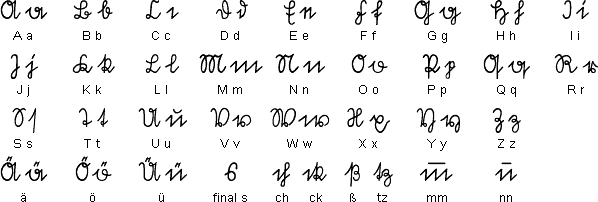
<p>This is the most tricky style. You may think it is hard to write in Fraktur style when you look at how <span class="katex"><span class="katex-mathml"><math xmlns="http://www.w3.org/1998/Math/MathML"><semantics><mrow><mtext>LaTeX</mtext></mrow><annotation encoding="application/x-tex">\LaTeX</annotation></semantics></math></span></span>’s default typeface renders it. Actually, it indeed is, but it is not intended for you to handwrite. I recommend write them as shown here (ignore the final line because we do not need them):</p>
<figure>
<img src="https://www.omniglot.com/images/writing/suetterlin.gif" class="dark-adaptive" alt="Written fraktur"/>

</figure>
<p>They look very distinguishable.</p>]]></content><author><name>UlyssesZhan</name><email>ulysseszhan@gmail.com</email></author><category term="misc" /><category term="from zhihu" /><category term="font" /><category term="tex" /><category term="handwriting" /><category term="long paper" /><summary type="html"><![CDATA[Personally, I have the demand of handwriting math/physics notes, but an annoying fact about this is that I usually cannot distinguish every letter that may be possibly used well enough. In this article, I will try to settle this problem.]]></summary><media:thumbnail xmlns:media="http://search.yahoo.com/mrss/" url="https://ulysseszh.github.io/assets/images/covers/2023-02-04-handwritten-font.png" /><media:content medium="image" url="https://ulysseszh.github.io/assets/images/covers/2023-02-04-handwritten-font.png" xmlns:media="http://search.yahoo.com/mrss/" /></entry><entry><title type="html"><![CDATA[Typesetting math in emails]]></title><link href="https://ulysseszh.github.io/programming/2022/11/08/math-emails.html" rel="alternate" type="text/html" title="Typesetting math in emails" /><published>2022-11-08T11:12:09-08:00</published><updated>2022-11-08T11:12:09-08:00</updated><id>https://ulysseszh.github.io/programming/2022/11/08/math-emails</id><content type="html" xml:base="https://ulysseszh.github.io/programming/2022/11/08/math-emails.html"><![CDATA[<p>After I become a university student, I start to heavily rely on emails to communicate with professors or teaching assistants. However, there is a problem around this form of communication considering that I am physics major: I cannot typeset math in emails.</p>
<p>Emails normally have two types of message body: plain text and HTML. Plain text is just plain text, we do not expect it to have any typesetting ability itself. However, HTML is a much more capable content type.</p>
<p>In theory, we should be able to ask the HTML renderer to typeset math by using <a href="https://developer.mozilla.org/en-US/docs/Web/MathML/Element/math" target="_blank" rel="external"><code>&lt;math&gt;</code> elements</a> (MathML). However, modern browsers generally do not support them by default. As for today (when this post is created), the only modern browsers that support MathML without modifications are Firefox and Safari. Chrome, Edge, and Opera support MathML only when the <code>#enable-experimental-web-platform-features</code> preferences are set to <code>Enabled</code>. Supporting for MathML is even worse if we are considering mobile browsers or email clients. Therefore, MathML should not be our first choice although it could have been the most elegant way.</p>
<p>The next choice is to use <code>&lt;img&gt;</code> or <code>&lt;svg&gt;</code> elements. There are two ways of doing this: host a server that has API to convert math to images; or, write a program to generate the email with all images generated (as image data URLs or <code>&lt;svg&gt;</code> elements) as well (actually I have already found a solution for such programs: <a href="https://rubygems.org/gems/mathematical" target="_blank" rel="external">mathematical</a>). The first way have the following disadvantages:</p>
<ul>
<li>It requires me to either use some third-party service (like <a href="https://latex.codecogs.com" target="_blank" rel="external">CODECOGS Equation Renderer</a>) or maintain a public server which would be exposed to my email receivers.</li>
<li>It is hard for me make the position of the baseline of rendered math correctly.</li>
<li>Email clients will probably block images from remote sources.</li>
</ul>
<p class="no-indent">
Both ways have the following disadvantages:
</p>
<ul>
<li>There is no “half-working”—either the math is rendered, or it cannot be read at all (on email clients that do not support or block <code>&lt;img&gt;</code> or <code>&lt;svg&gt;</code> elements).</li>
<li>Math expressions cannot have line breaks in the middle.</li>
<li>Images normally have a larger bandwidth burden.</li>
<li>It is hard to get them aware of the context (text size, color, etc.).</li>
</ul>
<p class="no-indent">
Therefore, I try to seek other ways.
</p>
<p>You may wonder how I typeset math in my blog. The answer is that I use <a href="https://mathjax.org" target="_blank" rel="external">MathJax</a>. To integrate it on a webpage, I just load a JavaScript script to the webpage, and it will convert all the <span class="katex"><span class="katex-mathml"><math xmlns="http://www.w3.org/1998/Math/MathML"><semantics><mrow><mtext>TeX</mtext></mrow><annotation encoding="application/x-tex">\TeX</annotation></semantics></math></span></span> expressions to math. Although we normally cannot have JavaScript in emails, this is actually also a good candidate for typesetting math in emails because I can <a href="https://docs.mathjax.org/en/latest/server/start.html" target="_blank" rel="external">use its Node.js module</a> to generate the email with math typeset. The generated email already has all the math rendered, and there is no client-side JavaScript needed.</p>
<p>However, before using Node.js to write my program of generating email, I looked into <a href="https://katex.org" target="_blank" rel="external">KaTeX</a>. How KaTeX advertise itself is saying that it is the <em>fastest</em> math typesetting library for the web. Well, actually I do not care about the speed of typesetting, but there is something about KaTeX that I found interesting: <a href="https://rubygems.org/gems/kramdown-math-katex" target="_blank" rel="external">kramdown-math-katex</a>, which implements for us the conversion from Markdown to HTML with math typeset. I am familiar with Ruby and prefer a Ruby project to a Node.js project, so this looks amazing to me. What is more amazing is that I can combine it with <a href="https://jekyllrb.com" target="_blank" rel="external">Jekyll</a> to create even more possibility about how I can generate my email.</p>
<p>Then, I implemented my idea and finally created <a href="https://github.com/UlyssesZh/genmail" target="_blank" rel="external">this</a>. I have already used it to generate some emails (such as <a href="/physics/2022/11/07/map-kepler-3-sphere.html">this one</a>). I then just paste the generated HTML into the HTML editor of my email client (Thunderbird, with <a href="https://betterbird.eu/addons/#ThunderHTMLedit" target="_blank" rel="external">this add-on</a>).</p>
<p>By generating the email, the email receivers can see the math typeset without running any JavaScript on their clients. However, they need their email client to support CSS styling (Thunderbird does). I need to inform the receiver of this every time I send an email containing math.</p>]]></content><author><name>UlyssesZhan</name><email>ulysseszhan@gmail.com</email></author><category term="programming" /><category term="jekyll" /><category term="ruby" /><category term="tex" /><summary type="html"><![CDATA[After some comparison among solutions, I use KaTeX to typeset math in my emails.]]></summary><media:thumbnail xmlns:media="http://search.yahoo.com/mrss/" url="https://ulysseszh.github.io/assets/images/covers/2022-11-08-math-emails.png" /><media:content medium="image" url="https://ulysseszh.github.io/assets/images/covers/2022-11-08-math-emails.png" xmlns:media="http://search.yahoo.com/mrss/" /></entry></feed>